What is an agent in Rose Rocket? An AI helper you ask
An agent is an AI helper in Rose Rocket that does a named job when asked: Rocky knows your whole organization, Rosie answers about the order you have open.
On this page3 sections
What it is
An agent is an AI helper inside Rose Rocket that does a named job for you, such as answering questions about the order you are looking at or reading a document onto a record.
Take a board, for example the Orders board. The round button at the right end of the top bar, Open Rocky Chat, opens Rocky, the agent for your whole organization. The clip above shows Rocky, not Rosie. Type how do I add a filter to a board, press Enter, and in a few seconds a numbered how-to comes back in the product’s own words. You asked the helper that knows how everything here is set up.
Which agent to ask
These are the four you will meet first, listed by how much people use them. Each has a job, so you know which one to ask.
| Agent | What it does | Plain analogy |
|---|---|---|
| Rocky | Reaches across your whole organization and knows the product: teaches you how to build something, finds where information lives, answers across objects and records | The ops lead who knows how everything is set up |
| Rosie | Starts from the record you have open: mention @Rosie in its Activity log and she answers about that load, and can look up other records by name. | The dispatcher who has that file open |
| DataBot | Reads documents such as PODs and rate confirmations onto the record | The clerk who types in the paperwork |
| TED | Reads inbound customer email and proposes the orders, quotes and updates it finds | The colleague who keys in the morning’s emails |
Rocky: your whole organization
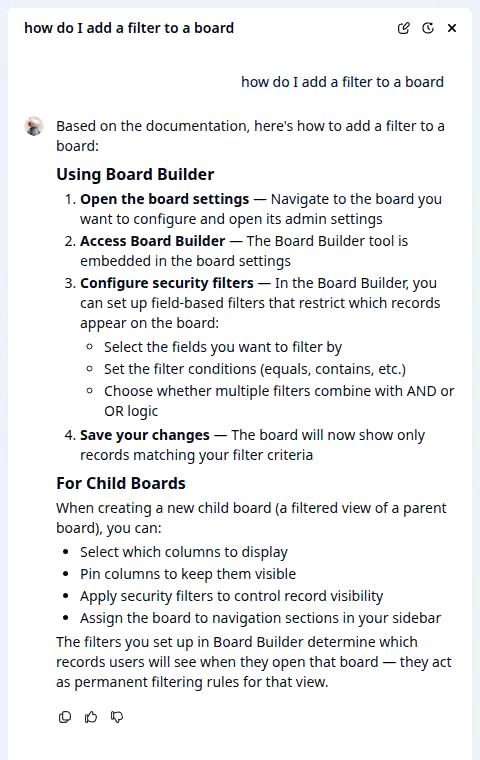
Ask Rocky how to do something and it answers with the steps, for example how to add a filter to a board. Ask where a piece of information lives, or about a record, and it reads across your objects and records. Rocky is not looking at any one record, so name the one you mean, for example summarize order ORD-28. To list orders by status you still use the board’s filters. Asking writes nothing; the thread stays under Chat history.
Rosie: the record you have open
Open an order, for example ORD-28, and Rosie answers about that load from the record itself, so you never say which order you mean. Ask Rosie about the load in front of you; ask Rocky how the product works or about anything beyond that record. On the screens shown here, only Rocky has a button.
DataBot and TED: paperwork and email in
DataBot works from a document on the record, such as a POD or a rate confirmation: it reads the file and writes what it finds onto the record’s fields. TED reads inbound customer email and proposes the order, quote or update it finds; you accept the suggestion and the record is created without retyping.
Asked by a person, or by a rule

An agent acts only when asked; it never wanders through your records on its own. A person asks from a button, for example Open Rocky Chat in the top bar of a board or a record page. A workflow can ask too: a rule can hand a record to an agent when it fires.
Builders say an agent has a job and tools: what it may read, do and answer.
Where you meet it in Rose Rocket
- A board (for example, the Orders board) → the round button at the right end of the top bar, Open Rocky Chat → Rocky’s panel opens beside the board.
- Open Rocky Chat (for example, after how do I add a filter to a board) → your question tops the thread, a status line while Rocky works, then the numbered answer with feedback icons under it → nothing written.
- Record page (for example, ORD-28) → the same Open Rocky Chat button in the top bar → ask about it by name.
Go deeper
- Platform basics: objects, records, boards, workflows
- What is a board?: where Rocky is opened above
- What is a record?: what Rosie is scoped to
- What is a document?: the file DataBot reads
- What is a workflow?: the rule that can call an agent
- Board views: the filters Rocky explained