What is a workflow in Rose Rocket? A rule on your records
A workflow is a rule that watches one kind of record and acts when something happens to it, for example Block edits on a sent invoice, which locks a bill.
On this page3 sections
What it is
A workflow is a rule that watches one kind of record and acts when something happens to it: when this happens, if this is true, do this.
Take a rule, for example Block edits on a sent invoice. It watches invoices. Once an invoice has gone to the customer, changing its date, its number or its terms would make the customer’s copy wrong, so the rule refuses the save. Nobody has to remember the policy; the rule remembers it, on every invoice, every time. Every workflow has the same three parts.
The trigger: when

The trigger is the event on one kind of record that wakes the rule. A rule watches one object only, so an invoice rule never fires for an order. Most rules wake when a record is committed or updated, for example Record committed on an invoice: someone pressed save, and the rule looks at what changed. Others wake when a record is created.
The condition: if
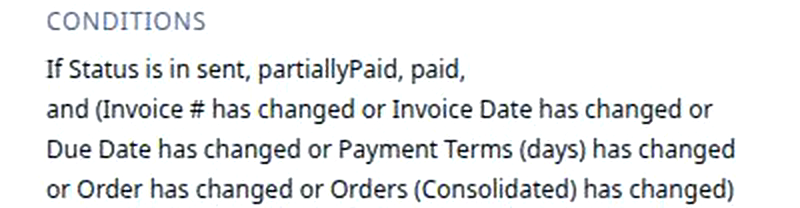
The condition is what must be true for the rule to go on. If it is not true, nothing happens and the save goes through as usual. A condition can also compare a field with what it held before the save. For example, Block edits on a sent invoice goes on only if Status is in sent, partiallyPaid or paid and one of the billing fields has changed, for example Invoice Date. A draft invoice, or a sent one where only a note changed, is left alone; that backward look is the Has Not Changed condition.
The action: do

The action is what the rule does once the trigger has fired and the condition holds. For example, Block Save: the change is refused, the record stays as it was, and the person sees a message saying why, right where they were editing.
What a workflow can do
These are the actions you will meet; the bold ones read as the Action column shows them:
| Action | What happens | Like… |
|---|---|---|
| Block save | The edit is refused and the person sees your message | A locked cell that refuses a typo |
| Set value · Copy value | A value is set, or copied in from another field | A spreadsheet formula that fills a cell for you |
| Create a record | A new record appears, filled in from the one that fired | A new line item added for you |
| Send a notification | An email or message goes to the people you name | A text from dispatch when a load runs late |
| Queue workflow | A longer job is queued to run after this one | Handing the next task to the next person in line |
Builders say a workflow is attached to an object and runs on its records: one rule, every invoice. Rocket Engine lists two kinds of rule side by side: an automation is one trigger, one condition and one action, like the example on this page; a workflow is a longer, branching job. This page uses workflow for both.
Where you meet it in Rose Rocket
- Settings › Rocket Engine › Workflows (for example, the row Block edits on a sent invoice) → every rule in your organization, one per row, with the object it watches, its event, condition and action. Rocket Engine is rolling out by organization and appears for administrators.
- The builder (Rocket engine › the rule’s name, for example Block edits on a sent invoice) → the rule as one node, Trigger, Conditions and Action top to bottom → the when, the if and the do of one rule.
- Record page (for example, an invoice) → where a Block Save rule shows its message when a save is refused → the workflow reaches the people who never open Rocket Engine.
Go deeper
- Platform basics: objects, records, boards, workflows
- Block Save: the action that refuses a save
- Has Not Changed condition: the condition that compares before and after
- Protect invoiced orders: the same idea, on orders
- Late ETA alerts: a workflow that sends a message
- What is a record?: the thing a workflow watches