Block save: refuse a save that breaks a rule in Rose Rocket
Block save is the Rocket Engine action that refuses a save when your condition holds, shows the person your message and lets the roles you name through.
On this page3 sections
What it does
Once you know what a workflow is, Block save is the action a workflow takes when a change must not go through. The trigger fires, the condition holds, and instead of saving, the record goes back to what it last held and the person who pressed save reads your message where they were typing. The page then reloads the last saved version, so what they see is what is stored.
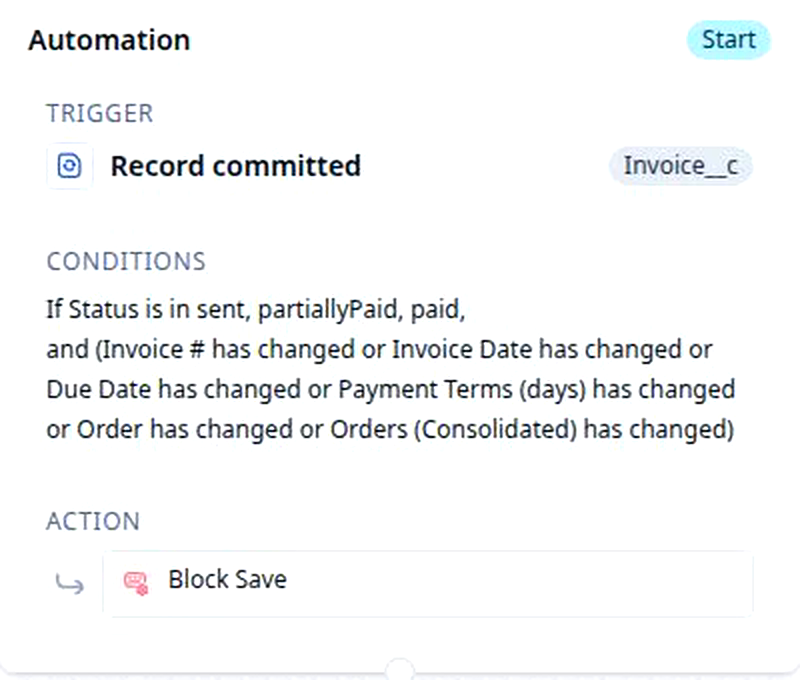
For example, the rule Block edits on a sent invoice watches invoices. Its trigger is Record committed, its condition is that Status is in sent, partiallyPaid or paid and one of Invoice #, Invoice Date, Due Date, Payment Terms or the order on it has changed, and its action is Block save. A billing clerk who changes the date on a sent invoice is refused and told why; a draft invoice, or a sent one where only a note changed, saves as usual.
A Block save action has three settings.
| Setting | What it does | For example |
|---|---|---|
| The message | The sentence the person reads when the save is refused. It can quote the record: {status} shows the value in that field, {status.$label} shows the field’s name. |
“This invoice has been sent. Reopen it before changing the Invoice Date.” |
| Roles that may save anyway | People in a role you name are let through; the rule holds for everyone else. | Admin |
| Groups that may save anyway | Members of a group you name are let through. | Billing |
A rule can also let through the one person a field on the record names, for example the user in a Locked by field, so the person who locked a record is the person who can still change it.
How you set it up
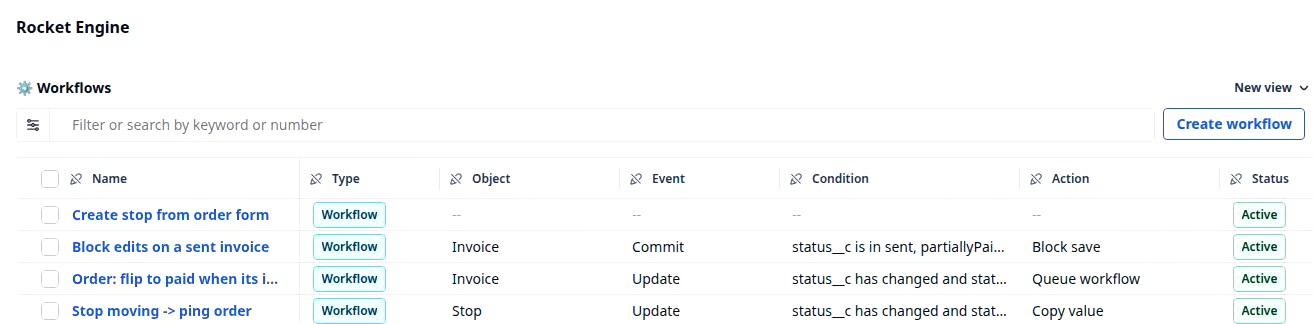
- Click Settings in the left nav, then Rocket Engine under Builders. The Workflows table lists every rule in your organization. Click Create workflow.
- Set the trigger: the object the rule watches, for example Invoice, and the event Record committed.
- Add the condition: the state the record must be in, and the field that must have changed during this save, for example Status is in sent, partiallyPaid or paid, and Invoice Date has changed. That backward look is the Has Not Changed condition.
- Pick the action Block save and write the message. Say what to do next, not what went wrong: “This invoice has been sent. Reopen it before changing the date.”
- Name the roles, and if you need them the groups, that may save anyway. Leave both empty and the rule holds for everyone, including you.
- Click Save changes. The rule is a new row in the Workflows table, with Block save in its Action column, and it is live on the next save.
Protect invoiced orders walks the same six steps on the Order object: once an order is invoiced, the carrier cannot change, the dispatcher reads why, and an admin can still fix a genuine mistake.
What to watch for
- Pick Record committed, not Record created or Record updated. A condition that asks whether a field has changed needs to know what the field held before this save, and only the commit event carries that. Pick Created or Updated with a “has changed” condition and the builder asks to switch you to the commit event. Say yes.
- Nobody is let through by name. The bypass is a role, a group, or a field on the record that names a user. To let one dispatcher through, give them a role or put them in a group; otherwise the rule blocks them, and it blocks you too unless your role is on the list.
- The message is for the person who meets it. That is usually a dispatcher or a billing clerk, not the person who wrote the rule. Name the field and the next step, and keep it to a sentence or two. It shows as plain text: no bold, no links, no line of your formatting survives.
- Only a save that changes something is checked. Opening a sent invoice and pressing save with nothing changed goes through. The rule looks only at a record with unsaved changes, so a “has changed” condition on the field you care about is what makes it precise.
- The refusal undoes the whole save. The record returns to its last saved state, not to the state before the one field that tripped the rule. Someone who changed three fields and was refused on one starts the other two again, so keep the rule to the fields the bill depends on.