Has not changed condition: a field before and after one save
The has not changed condition compares what a field held before a save with what it holds after, on Record committed, so a rule can lock a field by state.
On this page3 sections
What it does
Once you know what a workflow is, this condition is the part of a rule that looks backward. It compares the value a field held before this save with the value it holds after. On screen it reads has changed, and it holds when the two values differ. Has not changed is the same comparison turned over: the person is saving the value that was already there. Either way the rule is asking about this save only, not about the record’s history.
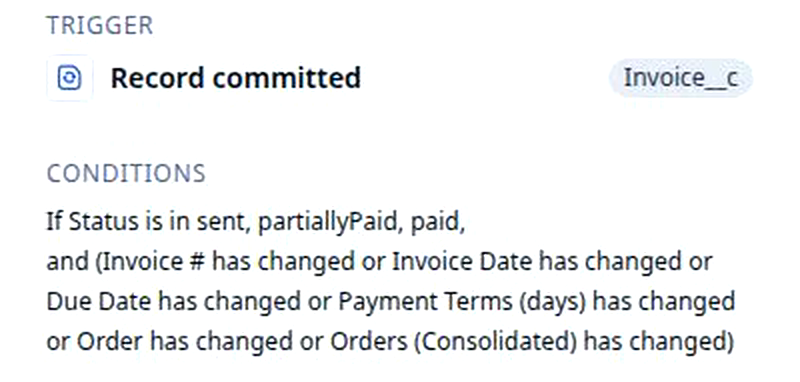
For example, the rule Block edits on a sent invoice watches invoices. Its condition holds when Status is in sent, partiallyPaid or paid and one of the billing fields, for example Invoice Date, has changed. The state check says which records the rule cares about; the change check says which edit. A draft invoice whose date moves saves as usual. A sent invoice whose date moves is refused.
The comparison needs the record as it was before the save, and only one event carries it. The trigger row offers Record created, Record updated, Record deleted and Record committed. Pick Created or Updated with a has changed condition and the builder asks to switch you to the commit event, because, in the words of the product documentation, it “has access to the ‘before’ state, which is required for change detection conditions”. Say yes.
A condition is built from three kinds of check, and a rule usually has two of them.
| Kind of check | What it asks | As the example rule reads |
|---|---|---|
| A field comparison | What the field holds now | Status is in sent, partiallyPaid, paid |
| A change check | Whether the field holds something different from before this save | Invoice Date has changed |
| A join: and, or, not | How the checks combine, or turns one over | Status is in sent, partiallyPaid, paid, and (Invoice # has changed or Invoice Date has changed) |
How you set it up
- Click Settings in the left nav, then Rocket Engine under Builders. Click Create workflow, or open an existing rule by its name in the Workflows table.
- In the trigger, pick the object the rule watches, for example Invoice, and the event Record committed. Pick the object first: changing it later clears every condition you have written.
- Add the state check: the field and the values that make this a record the rule cares about, for example Status is in sent, partiallyPaid or paid.
- Add the change check: pick the field, then has changed, for example Invoice Date. For has not changed, put a not around the same check.
- To watch several fields, add one has changed per field and join them with or inside one group, so the state check stays outside the group, joined with and.
- Pick the action, usually Block save, and click Save changes. The rule is a row in the Workflows table with Commit in its Event column.
Protect invoiced orders walks the same steps on the Order object: Status is invoiced and Carrier has changed, then Block save with a message the dispatcher reads.
What to watch for
- Created and Updated cannot see before. On those events the record arrives without its previous values, so a has changed condition has nothing to compare. The builder asks to switch you to Record committed the moment you add one. If a rule of yours never fires, check its Event column first: it should read Commit.
- It reads one save at a time. The before value is the record as it was last saved. A carrier swapped yesterday and saved is today’s before value, so a rule that watches Carrier stays quiet on a later save that leaves the carrier alone, even if other fields move.
- Not every field is in the list. The condition editor offers the fields a person can see on the record. System fields, for example the stamp of who created the record, and a few field types are not offered, so a rule cannot watch them for change.
- Several fields are several checks. The example rule reads Invoice # has changed or Invoice Date has changed or Due Date has changed, all inside one pair of brackets, with the state check outside them joined by and. Leave the brackets out and the or reaches the state check: a draft invoice whose date moved would then trip the rule too.
- Changing the object starts the condition over. Switching the trigger from Invoice to Order clears every condition on the rule, because the fields belong to the object. Settle the object, then write the checks.