What is a field in Rose Rocket? One named slot, one type
A field is one piece of information about an object, such as Status, Customer or Weight; its type decides how it is entered, filtered, totalled and shown.
On this page3 sections
What it is
A field is one piece of information about an object, such as Status, Customer or Weight, and its type decides how it is entered, filtered, totalled and shown.
Every object carries a list of fields, and every record of it has a place for each. Take the Order object, for example: Required Equipment is a Select with the options Flatbed and Step Deck. On an order, for example ORD-28, a dispatcher picks Flatbed; on the Orders board the same field is a column and a filter. It is defined once, in Object Builder, and every order gets it.
Field types
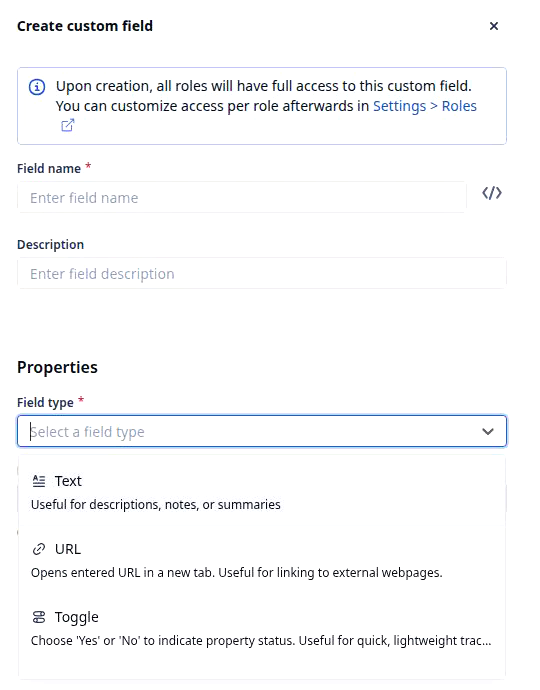
The type is chosen once, when the field is made, from the Field type list on the Create custom field form. The still shows the first three of seventeen; in the list’s order:
| Type | What it holds | Example |
|---|---|---|
| Text | Free text | Special instructions |
| URL | A web link | Tracking link |
| Toggle | Yes or No | Liftgate needed |
| Number | A number, decimals optional | Pallet count |
| Measurement | A number with a unit | Weight in lb |
| Address | A structured address with GPS coordinates | Pickup address |
| Money | An amount, negative allowed | Line Haul Rate |
| Select | One option from a list, or several | Required Equipment: Flatbed |
| Status | Progress, shown as a pill | Status: Booked |
| Full ID | An automatic ID: prefix plus sequence | Order ID: ORD-28 |
| Date | A date | Pickup date |
| DateTime | A date and time, or a range | Delivery window |
| Time | A time of day | Dock hours |
| Connection | One or many records of another object | Customer |
| Lookup | A field read from a connected record | Default Contact |
| Formula | A value calculated from other fields | Total Rate |
| Button | One click that runs a workflow | Approve |
What a type decides
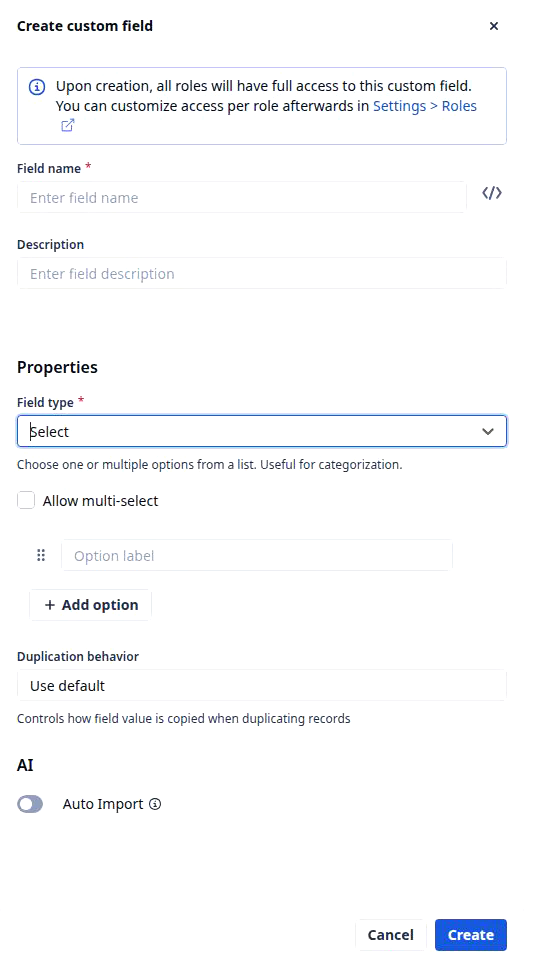
Pick a type and the form changes shape, because the type settles four things. Entry: a Select, for example Required Equipment, offers only its options. Filter: a Select filters by option, a Date by range. Totals: a Number, for example Total Weight (lb), sums down a board column; a Text never does. Display: a Status is a pill, a Connection a link to the record it points at. That is why customize the Order object makes Required Equipment a Select, not a note.
Formula fields
A formula field holds a value nobody types. Pick Formula and the form shows No formula added with a Set formula button, which opens an editor where a builder writes a calculation over other fields; every record shows the result, refreshed when the inputs change. How formulas are written is under what a formula field is.
Fields nobody typed
Some fields fill themselves. A record’s ID, for example ORD-28, is numbered when the record is created; Created at, Created by, Updated at and Updated by change on every save. They are fields like any other, so a board sorts, filters and shows them; what they hold on one record is under what a record is.
Builders address a field by its key, the Unique Identifier behind the </> icon; keys your team adds end in __c.
Where you meet it in Rose Rocket
- Object Builder (Settings › Builders › Objects, then an object, for example Order) → Available fields lists every field, Custom marks yours → Create custom field opens the form.
- Orders board (Operations › Orders) → a field is a column, for example Required Equipment, and a filter; the record page shows every field of one order.
Go deeper
- What an object is: the field list itself
- What a record is: every field filled in
- What a formula field is: computed, never typed
- Object Builder: where fields are made and typed