Trigger: the record event that wakes a Rocket Engine rule
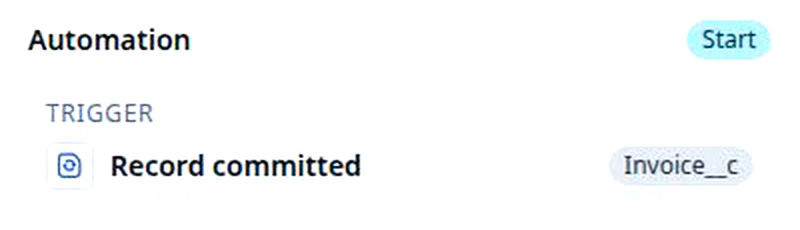
The trigger row of a Rocket Engine rule names the object it watches and the event that wakes it, and only Record committed sees what a field held before.
On this page3 sections
What it does
Once you know what a workflow is, the trigger is the part of a rule you set first: the object it watches and the event that wakes it. This page is about that when. What must be true before the rule goes on is the condition, for example has not changed; what the rule does is the action, for example Block save.
A rule watches one object and wakes on one or more of four events. For example, the rule Block edits on a sent invoice watches invoices and wakes on Record committed: each time an invoice is saved, the rule looks at what changed. A rule on stops that wakes on Record updated, for example Stop moving -> ping order, runs on every edit to a stop and never for an invoice.
| Event | When it fires | For example |
|---|---|---|
| Record created | A new record is saved for the first time | A quote is created: send the sales rep a notification |
| Record updated | An existing record is saved with changes | A stop’s status moves: copy the new status onto its order |
| Record deleted | A record is deleted | A stop is deleted: tell the dispatcher who owns its order |
| Record committed | After the save has gone through and the record’s checks have passed; this event carries the record as it was before the save, which Created and Updated do not | A sent invoice’s date changes: refuse the save |
Tick more than one event and the rule wakes on any of them, so a rule with Record created and Record updated both ticked runs on the first save and on every save after.
Two things start a rule without a record event. An automation wakes on a record event; a workflow can also start on a schedule with no record behind it, and that is a start on the clock, not one of the events above. The Rocket Engine page covers it. And a person can be the trigger: a Button field on a record page or in a board cell runs a workflow when someone clicks it, for example an Approve Order button on a quote, with a confirmation message if you set one. The button is made like any other field, in Object Builder.
How you set it up
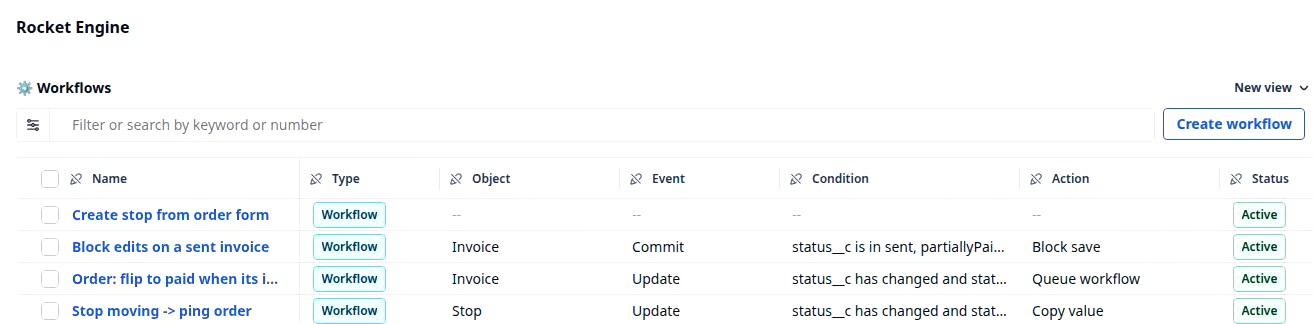
- Click Settings in the left nav, then Rocket Engine under Builders. The Workflows table lists every rule in your organization, with the event that wakes each one in its Event column. Click Create workflow, or open a rule by its name.
- In the trigger, pick the object the rule watches, for example Invoice. A rule watches one object only, and changing it later clears every condition you have written, so settle it first.
- Pick the event or events that wake the rule. If the condition will ask whether a field has changed, pick Record committed now; the other events cannot see what a field held before the save.
- Add the condition and the action. Those have their own pages, has not changed and Block save. Leave the condition empty and the rule runs on every event you ticked.
- Click Save changes. The rule is a row in the Workflows table, and its Event column reads the event you picked, for example Commit.
What to watch for
- Created and Updated cannot see before. On those events the rule sees the record as it is being saved and nothing of what it held a moment ago, so a condition that asks whether a field has changed has nothing to compare. Add one and the builder asks to switch you to Record committed. Say yes.
- A rule that saves a record wakes the rules on that record. Set value and Copy value are saves, so an action that writes the order’s Status wakes every rule watching orders, and a queued workflow that saves wakes them again. The engine stops a loop where one rule’s save wakes a second that wakes the first, but it does not stop a chain that is not a loop, so read the table for what else watches the object before you add a Set value.
- Every event fires more often than you think. Tick Record updated and Record committed together and one save wakes the rule twice, once as the record saves and once after the save has gone through; a dispatcher who edits a stop three times wakes it six times. A rule with no condition runs every one of those times. Pick the one event that names the moment you care about, and let the condition narrow it.
- Changing the object starts the trigger over. Switch the object from Invoice to Order and every condition on the rule is cleared, because the fields belong to the object. Settle the object, then the event, then the checks.